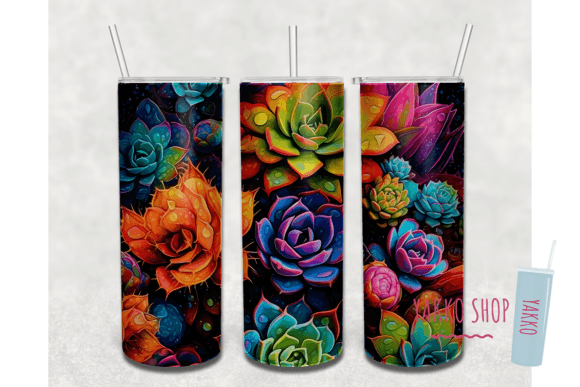
20oz 3D Succulent Tumbler Sublimation: A Practical Guide to Digital Files
Creating custom drinkware has evolved from simple vinyl decals to immersive, full-wrap designs that look professionally manufactured. The 20oz 3D succulent tumbler sublimation trend has gained significant traction because it combines the organic, calming aesthetic of botanical art with the technical precision of modern printing. When executed correctly, these designs create a realistic depth and texture that makes the succulents appear to grow around the curve of the vessel. However, achieving this high-end look relies entirely on understanding that you are working with a digital asset, not a physical product. Many creators face frustration not because the design is flawed, but because they misunderstand the technical requirements of printable PNG downloads.
Understanding the Digital Nature of Your Purchase
The most critical distinction to make before downloading any 20oz 3D succulent tumbler sublimation file is recognizing that this is strictly a digital transaction. You will not receive a printed wrap, a tumbler, or any physical props shown in mockup images. What you are acquiring is a high-resolution data file intended for production. This distinction matters because it shifts the responsibility of color accuracy, sizing, and material compatibility entirely onto you as the creator. Treating a digital download like a ready-to-use sticker leads to wasted ink, ruined blanks, and unnecessary disappointment.
This specific listing provides two PNG files at 300 DPI, which is the industry standard for crisp sublimation printing. These files are designed to be versatile, featuring dimensions of approximately 9.3” x 8.2”. This size accommodates both tapered and straight 20oz skinny tumblers, but "approximate" is the operative word here. Relying on default print settings without verifying measurements against your specific tumbler brand is a common error that results in gaps at the seam or designs that bleed over the rim.
Sizing Errors and Software Requirements
A frequent oversight among beginners and even some experienced sellers is assuming the downloaded file will automatically fit their tumbler when sent to the printer. It will not. You must have access to image editing software and the knowledge to use it. Programs like Photoshop, GIMP, Affinity Photo, or specialized sublimation RIP software are necessary to resize the 9.3” x 8.2” canvas to match your exact blank. Not all 20oz tumblers are manufactured to identical specifications; a tumbler from one supplier may require a 9.25” width while another needs 9.4”.
Failing to measure your physical tumbler and adjust the digital file accordingly causes alignment issues that no amount of heat pressing can fix. If the design is too small, you will have an unsightly vertical line where the pattern fails to meet. If it is too large, the overlap can create a dark seam or distort the 3D effect of the succulent imagery. Always measure the circumference and height of your specific tumbler before printing. Use your software’s ruler tool to set the document size precisely, rather than relying on visual estimation or percentage scaling.
The Misconception of Cutting Files
It is vital to clarify that this 20oz 3D succulent tumbler sublimation download is NOT a cutting file. There are no cut lines, registration marks, or vector paths included. Attempting to import this PNG into cutting software like Cricut Design Space or Silhouette Studio for the purpose of creating vinyl decals or stencils will result in poor quality outcomes. The resolution and format are optimized solely for dye-sublimation transfer. Confusing sublimation prints with cut files wastes time and often leads to users believing the file is corrupt when it is simply being used in the wrong application.
Navigating Color Variations and Print Reality
Perhaps the most nuanced aspect of working with botanical sublimation designs is managing color expectations. The vibrant greens and earthy tones seen on a computer monitor are rendered in RGB light, while sublimation printers use CMYK ink. Furthermore, the final color is influenced by the substrate coating, the paper type, and the heat press temperature. Colors will vary from screen to print, and this is a feature of the medium, not a defect in the digital file.
To avoid dissatisfaction with the final output, adopt a testing protocol. Never print a full 20oz wrap as your first attempt with a new batch of ink or paper. Print a small test swatch of the succulent design using your intended settings. Press it onto a spare tumbler or a coated test tile. Evaluate the saturation and tone under natural lighting. If the greens appear muddy or the shadows lack depth, adjust your ICC profile or color correction settings in your editing software before committing to the full design. This proactive step saves money on blanks and ensures the 3D effect translates effectively from screen to ceramic or steel.
Optimizing File Quality for Professional Results
The provided 300 DPI resolution is substantial enough to allow for sizing adjustments without pixelation, but there are limits. While you can size down safely, sizing up significantly beyond the original 9.3” x 8.2” dimensions may introduce softness. For standard 20oz skinny tumblers, the included size is optimal. However, if you are adapting this design for a larger vessel or a different aspect ratio, do so incrementally and check the sharpness of the leaf details. Blurry edges destroy the illusion of three-dimensionality that makes succulent designs desirable.
- Verify Dimensions: Measure your tumbler's height and circumference before opening the file.
- Check Software Compatibility: Ensure your editing program can handle high-resolution PNGs and export at 300 DPI.
- Color Management: Use appropriate ICC profiles for your specific printer and ink combination.
- Test First: Always run a swatch test to verify color accuracy and sizing.
- Understand the Format: Remember this is a raster image for printing, not a vector for cutting.
Making Informed Creative Decisions
Choosing the right 20oz 3D succulent tumbler sublimation design involves more than just liking the picture. It requires an honest assessment of your current setup and skills. If you do not own image editing software or lack the confidence to resize files accurately, take time to learn these basics before purchasing. There are numerous free tutorials available that cover resizing PNGs for sublimation. Investing thirty minutes in learning proper workflow prevents hours of troubleshooting later.
Additionally, consider the end-use of the tumbler. Succulent designs often feature intricate shading that showcases the quality of your equipment. If your printer has clogged nozzles or your heat press has uneven heating zones, these flaws will be immediately visible in the gradient areas of the plant leaves. Ensure your equipment is maintained and calibrated. The digital file provides the potential for beauty, but your technical execution determines the reality. By respecting the digital nature of this product and adhering to precise preparation standards, you transform a simple download into a professional-grade creation that stands out in a crowded market.