Pop Art Fusion 3D Tumbler Wrap: Integrating Digital Assets into Sublimation Workflows
In the competitive landscape of custom drinkware production, the efficiency of your digital asset library directly correlates to your output quality and turnaround time. The Pop Art Fusion 3D Tumbler Wrap is designed not merely as a standalone graphic, but as a functional component within a broader sublimation or printing workflow. For creators, small business owners, and hobbyists managing production schedules, understanding how to leverage this specific digital resource can streamline the transition from concept to physical product. This asset serves as a bridge between vibrant pop art aesthetics and the technical requirements of 20oz tumbler manufacturing, eliminating the need for complex 3D rendering software while maintaining high visual fidelity.
Defining the Asset in a Production Context
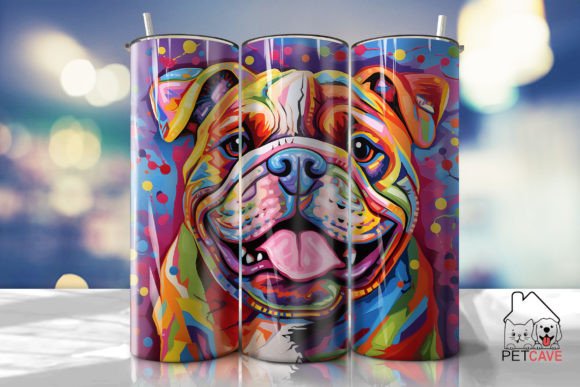
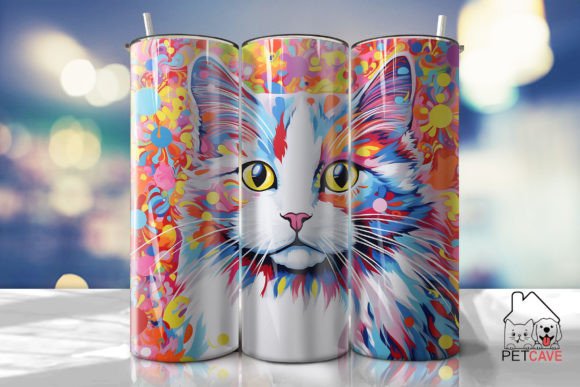
The Pop Art Fusion 3D Tumbler Wrap is a pre-rendered digital overlay that simulates three-dimensional depth, shading, and lighting effects on a two-dimensional plane. In practical terms, this means the design has already undergone the computationally intensive process of 3D mapping before it reaches your workspace. For professionals and educators creating merchandise, this distinction is vital. It allows you to apply sophisticated visual textures without requiring advanced modeling skills or expensive rendering hardware. The "fusion" aspect refers to the integration of bold pop art colorways with realistic surface contours, creating a design that appears tactile even when printed on smooth metal or polymer surfaces.
This type of asset fits into the pre-production phase of your workflow. Rather than spending hours manipulating flat vectors to curve around a cylinder, you are utilizing a purpose-built template. This shifts your focus from technical correction to creative application and order fulfillment. Whether you are preparing for a craft fair, fulfilling Etsy orders, or creating branded merchandise for a corporate event, this wrap acts as a foundational layer that ensures consistency across multiple units.
Technical Specifications and File Management
Successful implementation begins with proper file organization and understanding the technical parameters of what you receive. Upon purchase, you will download a single ZIP file containing two distinct high-resolution PNG assets. Both files are rendered at 300 DPI, which is the industry standard for professional-grade sublimation and waterslide printing. The dimensions for both variations are 9.3” x 8.2”, specifically calibrated for 20oz tumblers.
- Straight Wrap (9.3” x 8.2”): This file is engineered for straight-walled tumblers. It maintains uniform scaling from top to bottom, ensuring that the pop art elements do not distort vertically. Use this variation for standard skinny tumblers where the diameter remains constant.
- Tapered Wrap (9.3” x 8.2”): This version accounts for the geometric variance in tapered tumblers. The artwork is pre-distorted to compensate for the narrowing base, preventing the "smiling" or frowning effect often seen when straight designs are forced onto conical surfaces.
It is critical to note that this listing provides digital files only; no physical products are shipped. Furthermore, there are NO cutting files (SVG) included. This exclusion is intentional and workflow-specific. Because the design relies on 3D shading and gradient fusion, vectorizing the image would destroy the raster-based lighting effects. Attempting to convert these PNGs to SVGs for vinyl cutting will result in a loss of the intended aesthetic. This asset is strictly intended for sublimation, waterslide decals, or regular printing methods that support full-color raster graphics.
Pre-Press Preparation and Color Management
Integrating the Pop Art Fusion 3D Tumbler Wrap into your routine requires attention to color management before the printing stage. Colors may vary depending on devices, monitors, and printer profiles. As a productivity-minded creator, you should establish a testing protocol rather than assuming screen accuracy translates to print output. The vibrant hues characteristic of pop art are particularly sensitive to ICC profile mismatches.
Before committing to a full production run, print a test strip on your specific sublimation paper using your designated heat press settings. Compare the physical output against the digital file under consistent lighting conditions. If your workflow involves multiple printers or outsourcing, provide a physical color reference or request a proof to ensure the "fusion" effect retains its contrast. Proper preparation at this stage prevents material waste and rework, which are significant drains on profitability and time.
Application Methods and Workflow Integration
This digital wrap is versatile enough to support various application methods, each fitting differently into a maker’s schedule. Understanding where this asset sits in your specific process helps maximize its utility.
Sublimation Workflows
For sublimation users, this wrap is a direct-to-print solution. Because the file is already sized to 9.3” x 8.2”, it minimizes resizing errors in RIP software or design platforms like Photoshop and Canva. When integrating this into a batch workflow, create a master template with your alignment guides and bleed margins saved. Simply swap the Pop Art Fusion layer for different projects while retaining your print settings. This reduces setup time per unit and ensures that the 3D shading aligns correctly with the tumbler’s physical seam or handle placement.
Waterslide Decal Implementation
If your business model focuses on glass or non-coated surfaces where sublimation is not viable, this wrap serves as an excellent waterslide decal source. The 300 DPI resolution ensures crisp edges when the decal is soaked and applied. In this workflow, the digital asset interacts with clear or white waterslide paper depending on your substrate color. The pre-rendered shadows in the Pop Art Fusion design can actually enhance the decal's appearance by providing visual grounding, making the sticker look less like an afterthought and more like a factory-applied finish.
Hybrid Mixed Media Projects
Advanced creators often combine digital prints with physical embellishments. While this product does not include SVG cut files, the high-resolution PNG can serve as a registration guide. You can import the PNG into your cutting software as a background layer, then manually trace specific elements to create coordinating vinyl overlays or epoxy charms. This hybrid approach allows you to add tactile texture to the visual 3D effect, elevating the perceived value of the final product without redesigning the core artwork from scratch.
Quality Control and Long-Term Asset Utility
To maintain efficiency over time, treat the Pop Art Fusion 3D Tumbler Wrap as a reusable master asset rather than a disposable graphic. Store the original ZIP file in a cloud backup or external drive organized by theme and dimension. Never edit the original master file; always work on duplicates to preserve the integrity of the 300 DPI source. Overwriting the master with compressed or resized versions degrades future print quality and disrupts long-term workflow consistency.
When evaluating the success of this asset in your product line, track metrics beyond just sales volume. Monitor the time saved in the design phase compared to creating custom 3D renders. Assess the reduction in misprints due to the availability of both straight and tapered options. These operational insights help determine whether similar pre-rendered wraps should be added to your permanent resource library. For entrepreneurs and freelancers, building a curated collection of high-quality, technically accurate digital assets is a strategic investment that compounds in value as production scales.
Compatibility and System Requirements
Ensure your current tech stack supports high-resolution PNG manipulation before purchasing. While the file is compatible with most design software, working with 300 DPI images at 9.3” x 8.2” requires adequate RAM and processing power. Users on older tablets or entry-level laptops may experience lag when applying additional filters or text layers over the wrap. If your primary device struggles with large raster files, consider incorporating a proxy workflow where you design with lower-resolution placeholders and swap in the high-res Pop Art Fusion file only at the export stage.
Additionally, verify your printer’s maximum printable area. Although 9.3” x 8.2” is standard for 20oz tumblers, some compact printers have unprintable margins that exceed standard borders. Confirming hardware compatibility prevents frustration during the execution phase. This foresight is part of a mature production mindset, ensuring that digital purchases translate smoothly into physical outputs without technical bottlenecks.
Strategic Value for Creators and Businesses
Ultimately, the Pop Art Fusion 3D Tumbler Wrap represents a balance between artistic impact and operational pragmatism. For educators and bloggers demonstrating design concepts, it provides a tangible example of simulated 3D in 2D space. For small business owners, it offers a turnkey solution that maintains brand vibrancy without demanding extensive design hours. By understanding the specific deliverables—the straight and tapered PNGs—and respecting the limitations regarding SVGs and color variance, users can integrate this asset seamlessly into their existing routines.
The true value lies in how this tool facilitates flow. It removes the friction of complex 3D modeling and sizing adjustments, allowing you to focus on marketing, customer service, and product finishing. In a market saturated with generic designs, having access to specialized, technically precise wraps enables differentiation through quality and execution speed. Thank you for shopping with me, and may this asset contribute to a more efficient and creative production journey.