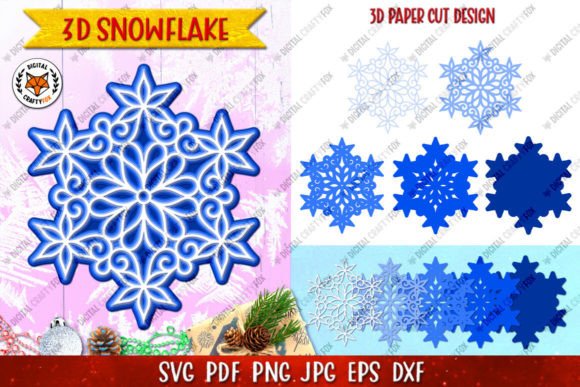
Mastering the 3D Snowflake Christmas Paper Cut: A Complete Guide to Layered Ornament Design
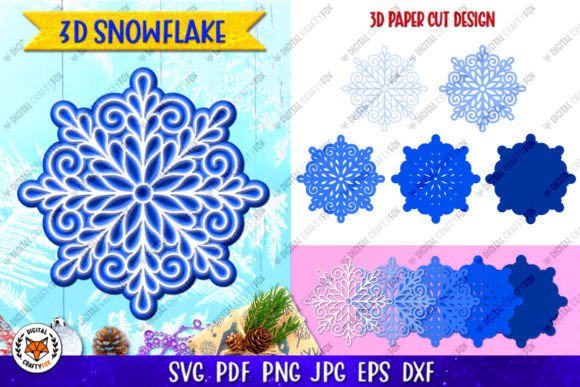
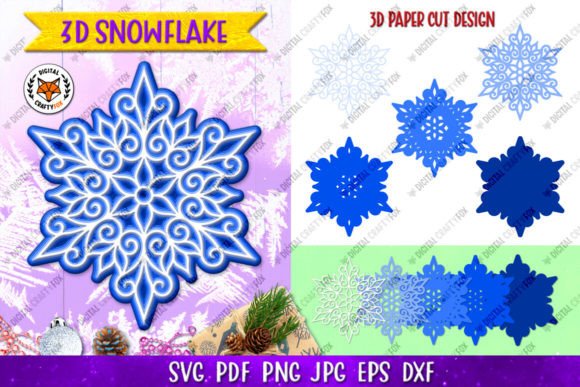
The holiday season is synonymous with tradition, nostalgia, and the tactile joy of handmade decorations. Among the most enduring symbols of winter is the snowflake, a motif that has evolved from simple folded paper cuts into sophisticated, multi-dimensional art forms. The 3D Snowflake Christmas Paper Cut represents a perfect intersection of traditional craftsmanship and modern digital fabrication. Whether you are a seasoned crafter utilizing a laser cutter, a small business owner creating sublimation products, or a hobbyist looking for a precise hand-cutting project, understanding the anatomy and application of these layered designs is essential for achieving professional results.
This guide explores the significance, technical requirements, and creative applications of 5-layer 3D snowflake ornaments. By understanding the files, materials, and assembly techniques involved, you can transform digital vectors into tangible holiday magic that elevates your seasonal decor or product line.
The Evolution of Paper Cutting in Modern Crafting
Paper cutting is an ancient art form found in cultures ranging from Chinese Jianzhi to Mexican Papel Picado. Historically, these were flat, two-dimensional silhouettes. However, the advent of precision cutting technology has revolutionized this craft. Today’s 3D Layered Christmas Ornament relies on depth perception created by stacking distinct layers. This technique mimics the intricate crystalline structure of real snowflakes, adding shadows and dimension that flat paper simply cannot achieve.
In the context of modern life and business, this evolution matters because it bridges the gap between mass production and bespoke artistry. For educators, these projects teach spatial reasoning and fine motor skills. For entrepreneurs, they offer a high-perceived-value product that can be produced efficiently. The 5-layer design specifically strikes an ideal balance; it provides enough complexity to look impressive without becoming so dense that it loses its delicate aesthetic or becomes impossible to assemble.
Understanding Digital File Formats for Crafters
A common misunderstanding among beginners is assuming all digital cut files are interchangeable. When you download a zip archive for a 3D snowflake, you are receiving a suite of specialized tools. Understanding which file to use for which machine or medium is critical for success.
Vector Files for Precision Cutting
For those using Cricut, Silhouette, Brother ScanNCut, or industrial laser cutters, vector files are non-negotiable. Vectors use mathematical paths rather than pixels, allowing for infinite scaling without quality loss.
- DXF (Drawing Exchange Format): This is the universal standard for cutting machines. It is typically required for free users of certain software platforms. DXF files ensure that your blade or laser follows the exact path intended by the designer.
- SVG (Scalable Vector Graphics): The preferred format for most modern crafting software like Cricut Design Space or Silhouette Studio. SVGs retain layer information and color coding, making it easier to organize your five distinct snowflake layers before cutting.
- EPS10 (Encapsulated PostScript): Designed for professional graphic design software like Adobe Illustrator or CorelDRAW. If you plan to modify the snowflake design, resize it significantly for large-format displays, or integrate it into other commercial artwork, EPS is your best choice.
Raster Files for Sublimation and Print
Not every project involves cutting. For sublimation printing, heat transfer vinyl, or digital scrapbooking, high-resolution raster images are required.
- PNG (3600x3600 pixels, 300 DPI): The inclusion of a transparent background is vital here. This allows you to overlay the snowflake onto colored shirts, mugs, or tumblers without a white box appearing around the design. At 300 DPI, this file ensures crisp edges even when printed at full size.
- JPG (3600x3600 pixels, 300 DPI): While similar to the PNG, the JPG usually includes a solid background. This is optimal for printing directly onto white cardstock as a template for hand cutting or for use in digital planning apps where transparency isn't necessary.
- PDF (300 DPI, Transparent Background): PDF serves as a hybrid. It is excellent for printing templates at home for hand cutting because it locks the dimensions. Unlike a Word document that might shift margins, a PDF guarantees that your 864x864 pixel design prints at the exact scale needed for the layers to align perfectly.
Material Selection and Assembly Techniques
Having the correct files is only half the battle; material choice dictates the final structural integrity of your 3D Snowflake Christmas Paper Cut.
Paper Weight and Texture
For a 5-layer ornament, paper weight is crucial. Standard copy paper (20lb/75gsm) is generally too flimsy to support the spacing between layers. Conversely, heavy cardstock (over 80lb/216gsm) can be difficult to cut intricately and may result in burnt edges if using a laser. The sweet spot for layered snowflakes is typically 65lb to 80lb (176gsm to 216gsm) cardstock. This weight holds foam tape spacers well and maintains rigidity without sacrificing detail.
Creating Depth
The "3D" effect is achieved through spacers. Foam adhesive squares or dots are the industry standard. For a 5-layer snowflake, consistency is key. Use the same thickness of foam tape for every layer to maintain uniform shadow lines. Alternatively, some crafters use rolled paper quilling strips as spacers for a more organic, textured gap between layers.
Laser Cutting Considerations
If you are using a laser cutter for this specific design, be aware of kerf (the width of material removed by the laser). Intricate snowflake patterns have tiny connection points. Always perform a test cut on your chosen paper stock. You may need to adjust power and speed settings to prevent scorching while ensuring the innermost details are fully released. Masking tape applied to the paper surface can also reduce soot marks on delicate white cardstock.
Creative Applications Beyond Traditional Ornaments
While designed as tree ornaments, the versatility of these digital assets extends far beyond December decor. Understanding the broader utility of these files maximizes their value.
- Sublimation Merchandise: Use the high-res PNG to create matching family pajama sets, insulated tumblers, or ceramic coasters. The intricate lace-like pattern of the snowflake translates beautifully to fabric and coated surfaces.
- Window Clings and Decals: Cut the design from adhesive vinyl or window cling material. Because the file includes separate layers, you can create a monochromatic stacked window display or mix colors for a stained-glass effect.
- Educational STEM Projects: Teachers can use the 5-layer structure to explain symmetry, geometry, and states of matter. Students can assemble the ornament while learning how hexagonal crystal lattices form in nature.
- Greeting Card Embellishments: Scale down the SVG or DXF file to create miniature versions for shaker cards or pop-up greeting cards. The layered effect adds a premium feel to handmade stationery.
Important Technical Disclaimers and Best Practices
When working with digital downloads for physical creation, managing expectations regarding color and output is part of the professional workflow. Please note that colors may differ from actual load depending on computer monitor and resolution. RGB color profiles, which are standard for screen display and many digital cut files, encompass a wider gamut than CMYK printers or physical paper dyes. There may be discrepancies between the way colors are displayed on the screen and the actual printing or material appearance.
Always print a test page or cut a single layer prototype before committing to a full production run. This verifies that your printer calibration matches your screen and that your cutting machine’s blade depth is calibrated correctly for the specific paper grain.
Supporting Creators and Community Standards
Digital design files represent significant time investment in drafting, testing, and formatting. These files are for digital download only and are intended for personal use or small-scale physical production, not for redistribution of the digital assets themselves. Respecting intellectual property ensures that designers continue to produce high-quality resources for the community.
If you encounter issues with file compatibility or assembly, do not hesitate to reach out. If you have any questions please contact me. Troubleshooting is often a simple matter of adjusting software import settings or clarifying assembly order. Furthermore, feedback drives improvement. If you liked the product, please rate my store. Reviews help other crafters make informed decisions and assist creators in refining future designs based on real-world user experiences.
Conclusion
The 3D Snowflake Christmas Paper Cut is more than just a seasonal decoration; it is a versatile digital asset that empowers makers to blend technology with tradition. By mastering the various file formats—from DXF for cutting to PNG for sublimation—and understanding the material science behind layered paper art, you open up endless creative possibilities. Whether you are building a business, teaching a class, or simply enjoying a quiet evening of crafting, these 5-layer designs provide a foundation for beautiful, dimensional art.
Thank you for visiting my store. Have a nice day, and happy creating!